
Elegant cocktail rendering in WordPress for mixology enthusiasts

Cocktail Recipes makes it easy to add structured, readable cocktail recipes to any WordPress page or post. It uses a simple shortcode with the recipe data to render ingredients, glassware and preparation instructions. Recipes are displayed in a clean, modern layout with automatic scaling and unit conversion, rendered in a consistent theme-independent format to allow seamless integration into any website. The plugin is designed for speed, maintainability and minimal frontend impact.
Key Features
- Simple [cocktail] shortcode for embedding recipes
- Clean, responsive recipe layout
- Automated parsing and normalization of ingredients and garnishes
- Supports a complete range of mixing methods, glassware and ice types
- Unit detection and automatic conversions
- Imperial units for the US and metric units for Europe, Japan and elsewhere
- Switchable summary and full step-by-step instruction views
- Controls for serving sizes and unit conversions
- Works with any theme; no frontend dependencies
- Customizable CSS for integration into any design
- Frontend assets loaded only when required
- Supports Gutenberg and the classic editor
- Caches parsed recipes for fast rendering
- Accessible, semantic markup with screen-reader-friendly structure and keyboard-friendly controls
- Supports localization and translation
Why Cocktail Recipes?
Cocktail Recipes was built to solve a simple problem: cocktail recipes in WordPress posts are often unstructured and tied to a theme’s formatting. This plugin provides a consistent and reliable format which keeps content clean, portable and easy to maintain. It is optimized for bloggers, bartenders and anyone writing about cocktails. It also makes it quick and easy to include a recipe without writing out lengthy instructions. The plugin generates a complete presentation from basic input, automatically. You just list the ingredients and garnishes, specify the method, glassware and ice, and it does the rest.
Technical Notes
- Modern, namespaced OOP architecture
- Lightweight inline footprint; core assets are fully external
- Cache-friendly rendering
- PHP 7.4+ compatible
- Safe with any theme framework
- Licensed under the GPLv2 or later




French Gimlet
Shortcode in post or page:
[cocktail]
  2 oz gin
  1 oz St-Germain
  3/4 oz lime juice
  method: shaken
  glassware: coupe
  garnish: lime twist
[/cocktail]
See it live at…

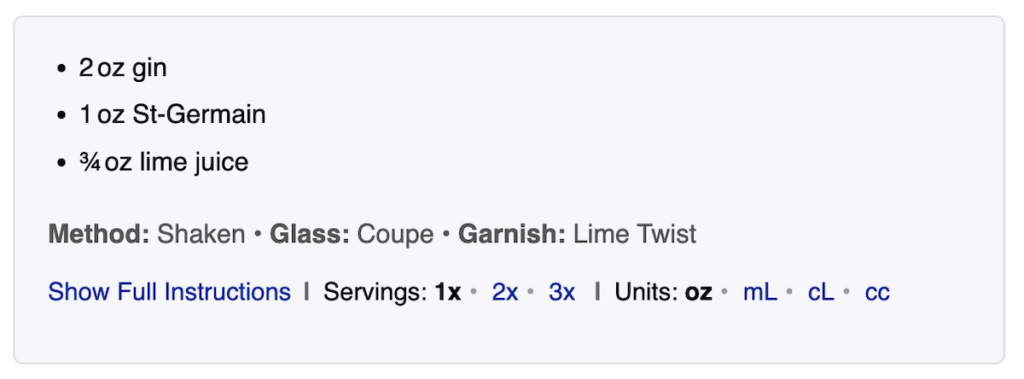
Rendering of Recipe Summary:
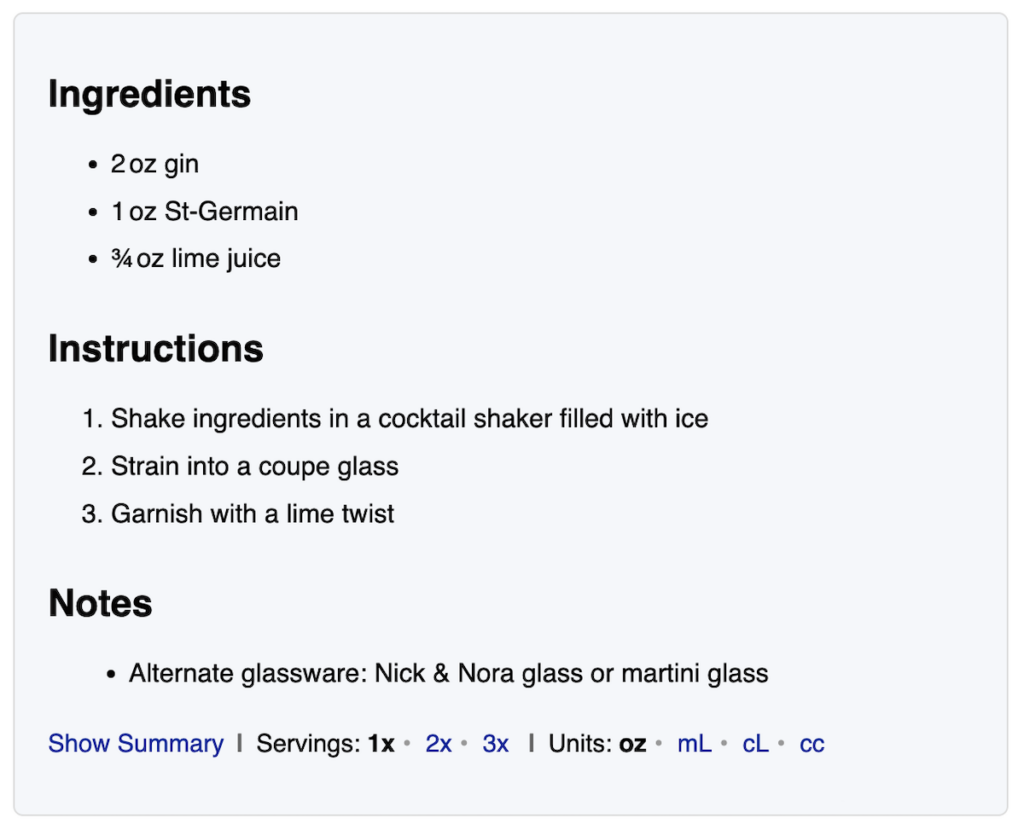
Rendering of Full Instructions:
1. Installation
- You can install the plugin from Plugins > Add New
- Alternatively, download the zip file, unzip it, and upload the cocktail-recipes folder to the /wp-content/plugins/ directory
- Activate the plugin through the Plugins menu in WordPress
- Adjust Settings > Cocktail Recipes as needed
Requirements
- PHP v7.4+
- WordPress 5.8+
2. Basic Usage
2.1 Adding a Cocktail Recipe
- Insert [cocktail] ... [/cocktail] into a post or page
- Include the necessary ingredients, garnishes, glassware, ice and preparation method within the recipe
2.2 Example: Old Fashioned
[cocktail]
  2 oz bourbon or rye
  1/4 oz simple syrup
  2-3 dashes Angostura bitters
  stirred
  large ice cube
  old fashioned glass
  garnish: lemon peel
[/cocktail]
2.3 Cocktail Recipe Format
- Cocktail recipes in posts and pages must start with [cocktail] and end with [/cocktail]
- Each line in the recipe describes a single element (i.e. item or technique) related to the cocktail
- Leading and trailing whitespaces are allowed and ignored; blank lines are ignored
- Comment lines, which begin with two-slashes, i.e. //, are ignored
- Inline comments are also allowed and ignored
- Detection of known methods, glassware, units, etc. is:
- case insensitive
- attempts to match symbols such as “oz” with or without periods
- supports various aliases for known elements to allow matching with equivalent terms
- Each line can be formatted as:
- a label and value such as “glass: old fashioned”, or
- as a complete value such as “old fashioned glass” which clearly identifies the element
2.4 Supported Labels
- Title: – an optional title to display at the top of the recipe
- Subtitle: – one or more optional subtitles or alternate name for the recipe
- Ingredient: – an ingredient with an optional leading quantity or quantity and units
- Garnish: – a garnish with an optional leading quantity
- Method: – a method such as: stirred, shaken, built, blended, rolled, thrown
- Ice: – an ice type such as: cubes, neat, large cube, crushed
- Glassware: – a glass type
- Notes: – a note to be shown at the end of the recipe
- Source: – a source for the recipe, with an optional markdown link
Some labels have alternative forms you may prefer to use, although they have the same function. For example, you can use Name: for Title and Aka: for Subtitle. See the Reference tab in Settings > Cocktail Recipes for a complete list.
2.5 Terms Without Labels
Many of the elements can be listed without a leading label, but they must be unambiguous. For example, while you could include Ice: yes, or Ice: cubes, merely writing “yes” or “ice” on a line could have multiple meanings and will not be understood. However, you can use ice cubes, on the rocks or with ice and it will be treated the same as using ice: yes
Ingredients, however, can always be entered on a line on their own, without requiring a “Ingredient:” label, since any line which does not match other known terms are assumed to be ingredients.
2.6 Quantities
Both garnishes and ingredients can include a quantity at the start of the line. For example, you could enter “garnish: 2 olives”. While ingredients normally would also contain units, this is not required and a line such as “4-5 mint leaves” will be interpreted as an ingredient of “mint leaves” with a quantity range of 4 to 5. Quantities can be entered in any of these formats:
- A whole number such as “2” or “3”
- A decimal value such as “1.5” or “0.75”
- A fractional value such as “1/2”, “1-1/4” or “2 1/2”
- A range such as “2 – 3”
2.7 Units
Ingredients are typically entered with both quantities and units. Each unit can be entered using its full name, as well as various aliases and alternatives. Symbols such as “oz”, “tsp”, “tbsp”, “ml” and others can be written with or without periods (e.g. “oz.”, “m.l.”, “tsp.”). The system will also properly detect the singular and plural forms regardless of whether they are used correctly for the quantity. Once normalized, the output will show the correct forms. Units supported include:
- Ounces (oz)
- Milliliters (mL)
- Centiliters (cL)
- Cubic Centimeters (cc)
- Teaspoons (tsp)
- Tablespoons (tbsp)
- Bar Spoons
- Drops
- Splashes
- Dashes
Note: Some units, such as bar spoons, drops, splashes and dashes cannot be used with fractional units. For example, “1/2 dash” will not be considered valid. In addition, the system expects reasonable quantities and/or ranges for each unit. For example, 12 dashes or 1-6 dashes would not be a realistic value the system would expect to see in a recipe.
3. Advanced Usage
3.1 Example: Corpse Reviver #2
[cocktail]
  3/4 oz gin
  3/4 oz Cointreau
  3/4 oz Lillet Blanc
  3/4 oz lemon juice
  dash of absinthe
  method: shake
  glassware: cocktail glass [chilled]
  glassware: nick & nora [alt]
  garnish: lemon peel
  garnish: orange peel [alt]
  garnish: cherry [opt]
  note: Traditionally an absinthe rinse is used instead of a dash in the cocktail
[/cocktail]
3.2 Pluralization
For entries with quantities, the system will attempt to convert to plural format as needed. If the language translation in effect has the necessary rules, then many terms can automatically be handled. For example, if “1 sugar cube” is used as an ingredient, when 2 servings is selected the line will be displayed as “2 sugar cubes”. Ingredients with units will not require pluralization, as the units will be pluralized instead. Only ingredients with quantities without units will require pluralization. Garnishes do not require this pluralization as they are always shown as a per cocktail item, and are not scaled or adjusted for servings or yield.
If an ingredient you are entering has an irregular singular vs plural form, or you are working in a language where the automatic rules either are not defined or do not handle your particular use case, you may enter it as follows so it can handle the correct form based on the quantity: “1 mint (leaf|leaves)”
3.3 Modifiers
At times you may need to specify a modifier term for an element. These are added within square brackets at the end of the element, such as “Garnish: brandied cherry [optional]”. Multiple modifiers can be included if needed using spaces or commas to delimit them. The following modifiers are supported:
- [alt] or [alternate] – specify a garnish or a glass is an alternative element
- [opt] or [optional] – specify an ingredient, garnish or ice is optional
- [chill] or [chilled] – specify a glass should be pre-chilled
3.4 Multiple, Alternate and Optional Garnishes
You may enter multiple garnishes and without any special modifiers they will be assumed to all be required. One or more optional garnishes may be listed and will be treated as individual items, each of which can optionally be added. If alternate garnishes are used with required garnishes, the alternates will be shown in the full instructions only. If alternate garnishes are used without any required garnishes they will be treated as a list of garnishes to select from.
The system will use reasonable limits to display minimal garnishes when there are both required and optional, or required and alternate entries in the summary view. In the instruction view, it will show all necessary, alternate and optional garnishes. It will also attempt to adjust what is shown, for example if you only include a single garnish and mark it as an alternative, it will be treated as the required garnish.
Examples:
- “cherry” + “lime twist” = “Garnish with a cherry and a lime twist”
- “cherry [alt]” + “lime twist [alt]” = “Garnish with a cherry or a lime twist”
- “cherry” + “lime twist [alt]” = “Garnish with a cherry” + “As an Alternative, you can garnish with a lime twist”
3.5 Alternative Glassware
While only a single glass is needed in a recipe, if you enter multiple, the first is considered the primary glassware type to be used, and the others are assumed to be alternatives. You can also specifically mark any glassware type as an alternative with the “[alt]” modifier. If no primary glassware is listed, the first alternative will be treated as the primary. If no alternatives are listed, the system will use any predefined alternatives for the primary glass type you specify.
3.6 Notes
You may add notes and comments to a recipe using the note: or comment: prefix. Notes support basic markdown, such as _italic_, **bold**, <domain.com>, [text](url), etc.
3.7 Source
You may add sources for a recipe using the source:, credit: or from: prefix. Source also supports basic markdown, which is useful for linking to the original source of the cocktail recipe.
3.8 Markdown
The parser supports the following basic markdown for use in notes and sources:
- Bold: **text** or __text__
- Italic: _text_ or *text*
- Inline code: `text`
- Autolinks: <https://example.com>, <mailto:address> or <user@example.com>
- Links: [text](url) or [text](url "description")
3.9 Escaping Special Characters
You can escape special characters inside recipe lines using a backslash (“\”). Use escaping when you need to prevent a character from being interpreted as part of a unit, modifier, label or markdown syntax. For example, “\_not italic\_” would prevent it from being shown as italic.
4. Recipe Display
4.1 Summary View
By default, the system will initially render a cocktail recipe in summary format. This will include the list of ingredients, followed by a summary line with the method, glassware type, ice type and/or required garnish.
4.2 Full Instruction View
If the user selects to view the full instructions, the cocktail will expand and the summary will be replaced with the list of ingredients, step-by-step instructions, notes and/or sources. The steps will be built from the predefined instructions for each method, with the necessary placeholders inserted from the elements entered for the recipe.
4.3 Cocktail Recipe Controls
Below the recipe controls will allow the user to:
- Switch between Summary and Full Instructions view
- Select serving sizes such as 1x, 2x or 3x
- Switch between imperial and metric units
When serving size is set to a value larger than 1x, the ingredient quantities will be scaled, but the ice, glasses and garnishes still refer to each drink and will remain unchanged. If imperial units are selected (i.e. “oz”), the ingredient quantities will be shown as ounces (“oz”), and for smaller amounts as teaspoons (“tsp”). If a recipe is entered using mixed units, such as one ingredient in ounces and another in milliliters, they will be rendered using the same units. Units converted based on 30 mL used as a 1 oz equivalent for cocktails, and rounded to reasonable precision, such as ounces rounded to the nearest 1/4 oz or shown as the nearest 1/4 tsp for smaller amounts.
5. Troubleshooting
5.1 Common Parsing Issues
- Misspelled units – While the system supports a wide range of variation to detect each unit, if your units are not detected check that you spelled them correctly and did not add unexpected characters within them.
- Glassware, method or ice appearing as an ingredient – If a line is not properly detected, it is assumed to be an ingredient, so you may need to add a prefix such as “glass:” to ensure the line you entered is detected as expected.
- Missing alternate glass types – If you use aliases for glassware such as “rocks glass” and “old fashioned glass” they will be treated as duplicates and only one will be shown.
- Units without quantities – If you enter “dash of absinthe” or “a dash of absinthe” the parser will not have a quantity to detect. Instead, you should enter “1 dash of absinthe” or “1 dash absinthe” to allow proper detection.
- Garnishes without prefix – If you enter “garnish with lemon peel”, “lemon peel as garnish” or “lemon peel garnish” the system will not detect it as a garnish. Instead, use “garnish: lemon peel” so that the prefix clearly indicates the element type.
5.2 Duplicate and Unexpected Elements
When recipe elements are read the following rules are applied:
- only a single preparation method is expected
- only a single ice type is expected, although it can be optional
- multiple ingredients are allowed, and one or more of them may be optional
- duplicate elements are not expected
- a title is not required, but if used only one is allowed; multiple subtitles are allowed
5.3 Errors
If errors are detected when parsing a recipe they are normally written into the HTML source as comments so they do not impact the rendering. When viewing the page with permission to edit the content, any errors are normally displayed to allow them to be detected and correct more easily.
6. For Developers
6.1 Custom CSS
You can adjust and override the styling in your theme or child theme by using selectors with higher specificity than the plugin. Class names are applied to the various components in the cocktail template, including .cocktail, .cocktail-inner, .ingredients, .cocktail-summary, .cocktail-instructions, etc. You should review the cocktail-recipe template as well as the default styling in assets/css/cocktail-recipe.css. The default CSS is intentionally minimal and avoids theme-specific assumptions, making overrides predictable and safe.
6.2 Template Overrides
If you wish to adjust the cocktail recipe template, it is recommended you create a child theme and then copy the file from wp-content/plugins/cocktail-recipes/templates/cocktail-recipe.php to wp-content/themes/your-theme/cocktail-recipes/cocktail-recipe.php and adjust it as needed. You should not directly modify the template in the plugin as your changes will be overridden with an update.
Two partial templates also exist: “partials/cocktail-controls.php” which contains the rendering for the recipe controls and “partials/cocktail-admin-info.php” which contains error and debugging output for authors and admins.
6.3 Filters and Actions
The following filters are available:
- cocktail_recipes_rendered – filter the final HTML output before display
6.4 Caching
A complete list of each recipe term including all methods, glassware, ice types and units is built on first use and cached as a “token map” to improve recipe parsing performance. Each cocktail recipe is also cached when first read to improve page load performance. Cache entries are refreshed when any change is made to a recipe.
6.5 JavaScript
The plugin includes a small, self-contained script for the view/serving/unit controls. It only runs inside .cocktail blocks and is loaded only on pages where the shortcode appears.
If Cocktail Recipes has been helpful, you can support ongoing development at Buy Me a CoffeeIf you need help using Cocktail Recipes, the following resources may be useful:
- Review the Documentation for usage details
- Check the FAQ for answers to common questions
- Visit the Cocktail Recipes Support Forum on WordPress.org
- Developers can report bugs or suggest improvements on GitLab:
Cocktail Recipes Repository
To request new features, you can:
- Visit the Support Forum
- Submit the a Feature Request issue on GitLab
When reporting a problem, please include:
- The cocktail shortcode you are using (or a minimal example)
- Your WordPress version and theme
- Your browser and device
- Whether you are using caching or optimization plugins
No known issues at this time. Enjoying Cocktail Recipes?
Help support future development:
